
SOLUTION //
Services Manager Windows
A site is down because its IIS application pool keeps stopping. How 2501 finds out why and restarts only that pool, never all of IIS, within limits you set.
TICKETS FROM
ServiceNow or another ITSM
SAFEGUARDS
Your rules, confirmation and blacklists
AUTONOMY
Investigate only, with a person, or on its own
DEPLOYMENT
On-prem, cloud or hybrid
█
SOLUTION_BRIEFING
// HOW 2501 HANDLES IT
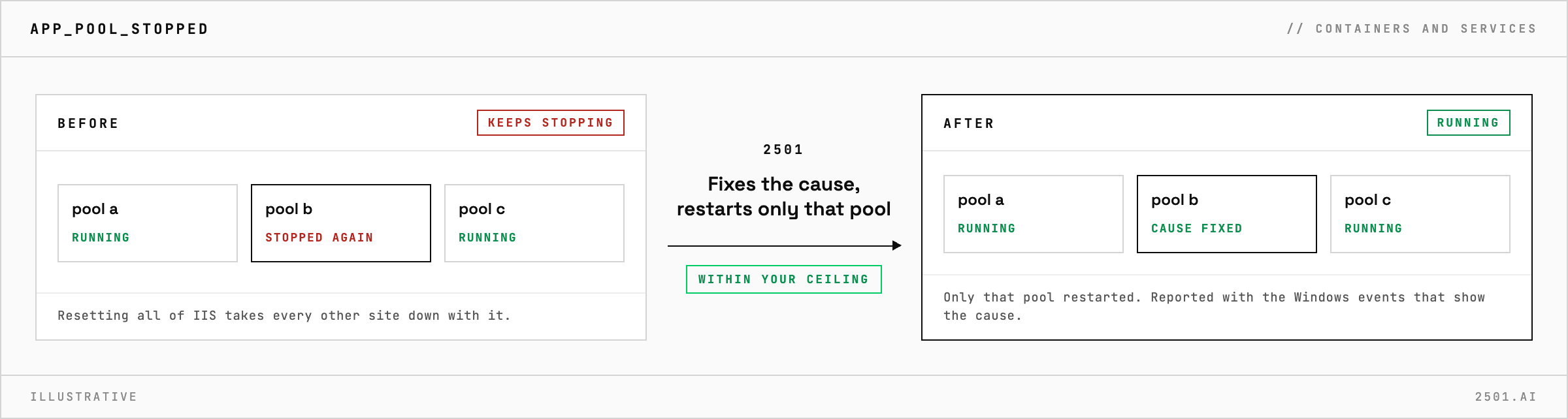
When an IIS application pool keeps stopping, resetting all of IIS brings the site back for a while, but it takes every other site on the server down with it and leaves the cause in place. 2501 finds out why the pool stops, fixes what it safely can and restarts only that pool, within limits you set.
The cause may be a configuration error, a missing file, a permission, or the account the pool runs under, with an expired password or a locked account.
The Services Manager Windows specialty investigates before it changes anything, from the pool's settings and account to the event logs, and names the cause with the Windows events that show it. It corrects an obvious configuration error, restarts only that pool or site and confirms the site is healthy; if the pool stops again, it looks further rather than restarting it again. An account problem that needs work in Active Directory, or a full disk, can be handed to the agent that covers it. The report says what it found and did.

Why does the pool keep stopping by itself? IIS stops a pool on purpose when its worker process crashes several times in a short period. Starting it again without fixing the cause starts the cycle over.
Can it diagnose without restarting anything? Yes. In investigate-only mode it reports the cause and the fix it would make, and changes nothing.
> READY_TO_DEPLOY
Book a technical demo and walk through your own environment with the 2501 team.
