
// SYS.ONLINE — 2501.AI COMMAND INTERFACE
[STATUS: ACTIVE]
2501/Agent specialties/Proxmox VE Operators

AGENT SPECIALTY //

Virtualization

Proxmox VE Operators: VMs, containers and cluster health

The Proxmox VE Operators handle VM and container lifecycle, node and cluster health, storage, and backup and restore, through the Proxmox API or on the node itself.

A Proxmox VE node running hot is diagnosed by 2501, which names the guest behind the sustained load and sets out stopping or migrating it for a person to approve

ServiceNow or another ITSM

Virtualization

Investigate only, with a person, or on its own

On-prem, cloud or hybrid

SPECIALTY_BRIEFING

// WHAT 2501 DOES

2501's three Proxmox VE Operators handle VM and container lifecycle, node and cluster health, storage, and backup and restore on Proxmox VE: one through the Proxmox API, one on a node itself and one across a cluster. They act only as far as you allow.

A node runs hot and nobody knows which guest is responsible, or a VM has stopped. Each ticket starts by working out whether the problem is the hypervisor or a guest.

What 2501 does

The three Proxmox VE Operators each reach Proxmox VE a different way:

  • Proxmox VE API Operator: through the API from a management host, with a limited access key and without logging in to the hypervisor itself. What the key cannot see is reported, not worked around.
  • Proxmox VE CLI Operator: on the node itself, which also reaches node load, storage and Proxmox's own services.
  • Proxmox VE Cluster Operator: across a cluster, for quorum and node health, shared storage, migration, high availability, and backup and restore.

Through the API or on a node, it diagnoses on its own and starts a stopped guest when the ticket asks. Stopping, resetting, reconfiguring or migrating a running guest is set out for a person to approve.
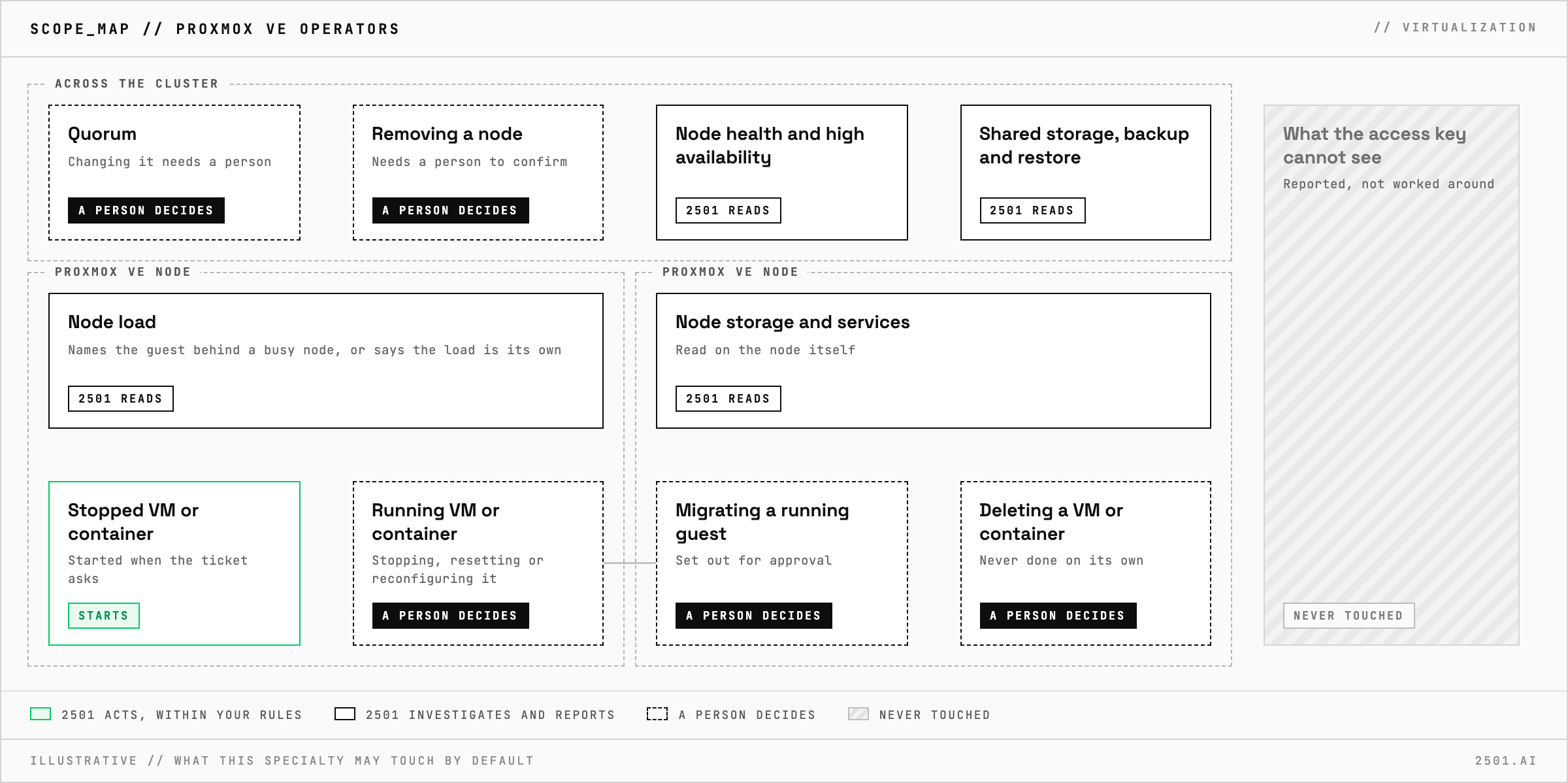
Scope map of 2501's Proxmox VE Operators: it reads node load, node storage and services, node health, high availability, shared storage and backups, and starts a stopped VM or container when the ticket asks; stopping, resetting, reconfiguring, migrating or deleting a guest, changing quorum and removing a node need a person, and what the access key cannot see is reported, not worked around.

You stay in control

  • You choose the level, per specialty: investigate only, act after a person confirms, or act on its own within your rules.
  • Through the API, the access key is the hard limit: its role decides what the agent can see and change.
  • Your rules decide which nodes and guests are in scope, and destructive commands can be blacklisted outright.
  • On-prem, cloud or hybrid: 2501 runs wherever you do. On-prem, no data leaves your network.

Frequently asked

What will it never do on its own? Delete a VM or container, whichever way it connects. On a cluster, changing quorum or removing a node also needs a person's confirmation.

Can it tell which guest is loading a busy node? Yes. It names the guest and whether the load is a spike or sustained, or says the load is the node's own.

Related

Problems it handles

Each page is one kind of ticket, and how this specialty handles it within the limits you set.

> READY_TO_DEPLOY

SEE IT ON YOUR OWN INFRASTRUCTURE

Book a technical demo and walk through your own environment with the 2501 team.

REQUEST DEMO

CONTACT SALES