
SOLUTION //
HOW 2501 WORKS
An AI agent that investigates and reports but cannot change anything, enforced by a second engine rather than the agent's cooperation. How it works and when to use it.

TICKETS FROM
ServiceNow or another ITSM
SAFEGUARDS
Your rules, confirmation and blacklists
AUTONOMY
Investigate only, with a person, or on its own
DEPLOYMENT
On-prem, cloud or hybrid
█
SOLUTION_BRIEFING
// HOW 2501 HANDLES IT
A read-only agent investigates and reports, and cannot change anything. That is enforced by a second engine that reviews every command before it runs, not by trusting the agent to behave. It is the right setting when you want a diagnosis rather than a fix, and it is where most teams should start.
The question behind every evaluation of autonomous operations is the same: what happens when it gets something wrong at 3am? Read-only is the answer that does not ask you to trust anything.
In much AI tooling, "read-only" is an instruction the model is asked to follow. That is a habit, not a guarantee, and it cannot be shown to an auditor. 2501 has two independent layers. The agent is told it is in read-only mode, and a separate engine reviews every command before it runs and blocks anything that would change the system. Beneath both sit your blacklists, which do not rely on an AI judgment at all, and the access you grant the agent, which caps what is possible whatever it concludes.
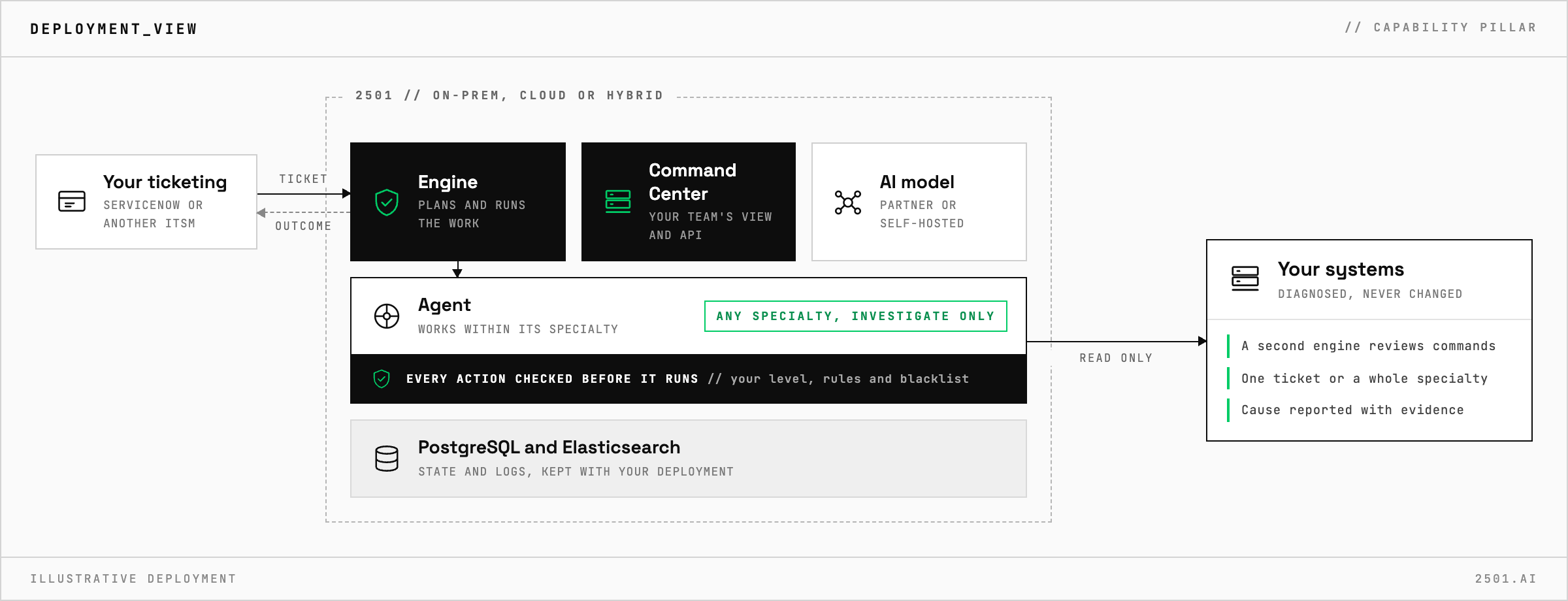
A locked specialty cannot be talked out of it. A ticket asking for a fix ends as partially done, with a comment on the ticket explaining what the agent found and why it did not act.
For many teams it is not a trial. In change-controlled environments, automating the diagnosis is the whole available win. In regulated estates, an auditor needs to see that a system could not make a change. For everyone else, the recommended rollout is to start each new specialty investigate-only, watch its plans for a week, and lift the limit only when they look right.
How is this different from monitoring? Monitoring tells you a threshold was crossed. A read-only agent works out why and reports a cause with evidence, on the ticket in the tool you already use.
Can a read-only agent be tricked into making a change? An instruction can be manipulated; the enforcement cannot. Every command is still reviewed before it runs, and the blacklist involves no AI decision.
Does it work on air-gapped infrastructure? Yes. 2501 runs on-prem, in the cloud or hybrid, and on-prem it can run fully air-gapped with no data leaving your network.
> READY_TO_DEPLOY
Book a technical demo and walk through your own environment with the 2501 team.
