
SOLUTION //
PostgreSQL Manager
Raising the connection limit hides whatever is holding PostgreSQL connections. How 2501 finds it, frees stuck sessions gently and leaves configuration and restarts to you.
TICKETS FROM
ServiceNow or another ITSM
SAFEGUARDS
Your rules, confirmation and blacklists
AUTONOMY
Investigate only, with a person, or on its own
DEPLOYMENT
On-prem, cloud or hybrid
█
SOLUTION_BRIEFING
// HOW 2501 HANDLES IT
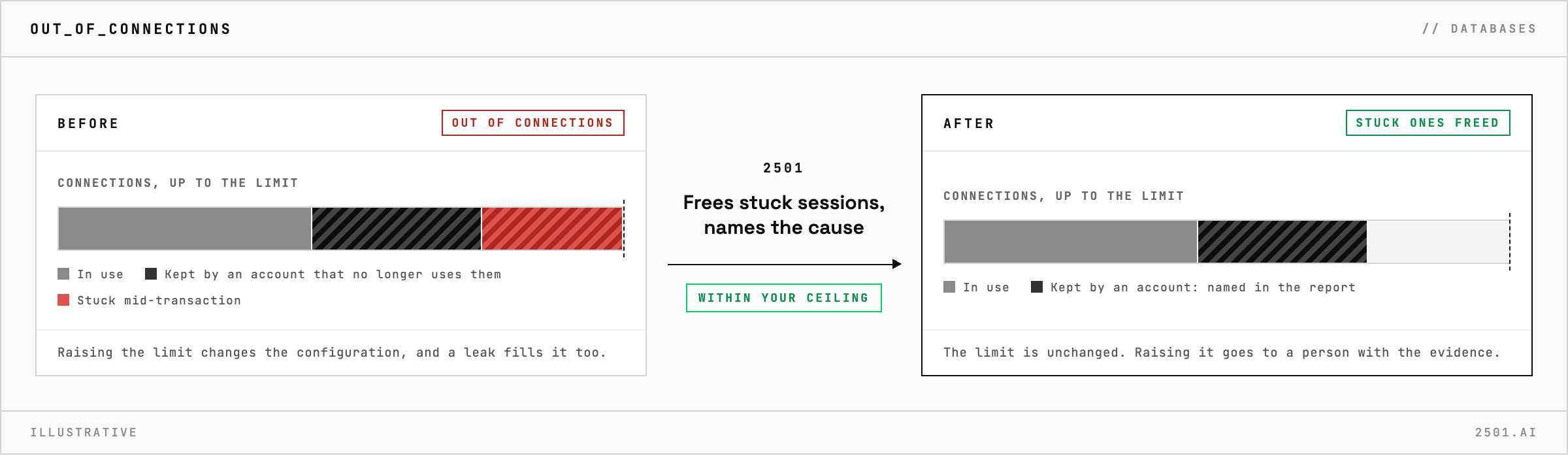
When PostgreSQL runs out of connections, raising the limit is the tempting fix, but it changes the server's configuration, and an application that leaks connections soon fills the new limit too. 2501 finds what is holding the connections, frees stuck ones where you allow it, and leaves configuration and restarts to a person.
The cause is often an application or service account keeping connections it no longer uses, or a session left open mid-transaction, holding locks that other work waits behind.
The PostgreSQL specialty takes the ticket from your ticketing system and investigates before it changes anything: which accounts and databases hold the connections, which sessions are idle or stuck mid-transaction, and whether one is blocking the others. Within your limits it clears sessions that are clearly stuck, and names the application or account behind the problem.
Raising the server's own connection limit is a configuration change, so it goes to a person with the evidence. Its report says what it changed and why. If PostgreSQL itself is down, it hands the ticket to the services specialty with its findings.

Why not just raise the connection limit? A higher limit does not release what is holding the connections, so a leaking application fills it too, and the change waits for a person anyway.
Will it end sessions to free connections? Only sessions that are clearly stuck, such as one left open mid-transaction and holding locks, trying the gentlest option first.
> READY_TO_DEPLOY
Book a technical demo and walk through your own environment with the 2501 team.
