AGENT SPECIALTY //
Databases
Elasticsearch Operator investigates red and yellow Elasticsearch and OpenSearch clusters, from unassigned shards to snapshots, and recovers them without deleting an index.

TICKETS FROM
ServiceNow or another ITSM
CATEGORY
Databases
AUTONOMY
Investigate only, with a person, or on its own
DEPLOYMENT
On-prem, cloud or hybrid
█
SPECIALTY_BRIEFING
// WHAT 2501 DOES
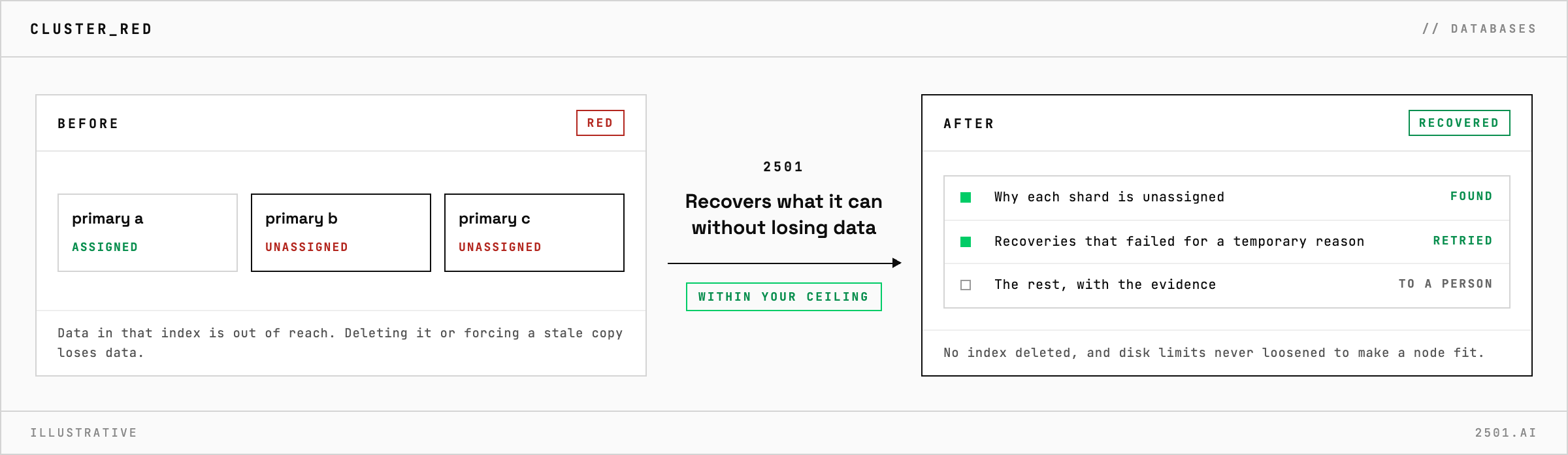
When an Elasticsearch or OpenSearch cluster turns red or yellow, 2501's Elasticsearch Operator specialty works out why each shard is unassigned and recovers what can be recovered safely.
A red cluster means at least one primary shard is unassigned, so part of an index cannot be searched or written. The fixes people reach for under pressure, deleting the index or forcing the shard back from whatever copy is left, are the ones that lose data.
The Elasticsearch specialty takes these alerts and requests from your ticketing system. It finds the reason behind each unassigned shard, whether a node left, an allocation failed or a disk filled, and retries the recoveries that are safe to retry. It reopens indices in scope, diagnoses lifecycle rules that stopped rotating indices, checks that snapshot storage works, and investigates failed snapshots, slow indexing or searches and nodes that dropped out. It restores from a snapshot only when a ticket asks, and into a new index beside the live one.

Will it delete a red index to turn the cluster green? No. That index may hold the only recoverable copy of its data, so it is recovered or escalated, not removed.
Why did my indices become read-only? Usually a data node ran short of disk and the cluster blocked writes. 2501 lifts the block only once the disk problem is solved, without loosening the disk limits.
Each page is one kind of ticket, and how this specialty handles it within the limits you set.
> READY_TO_DEPLOY
Book a technical demo and walk through your own environment with the 2501 team.