
SOLUTION //
VMware Datastore Operator
Deleting the biggest files is the quick fix for a full datastore. How 2501 removes only the snapshots your policy allows and keeps files that only look orphaned.
TICKETS FROM
ServiceNow or another ITSM
SAFEGUARDS
Your rules, confirmation and blacklists
AUTONOMY
Investigate only, with a person, or on its own
DEPLOYMENT
On-prem, cloud or hybrid
█
SOLUTION_BRIEFING
// HOW 2501 HANDLES IT
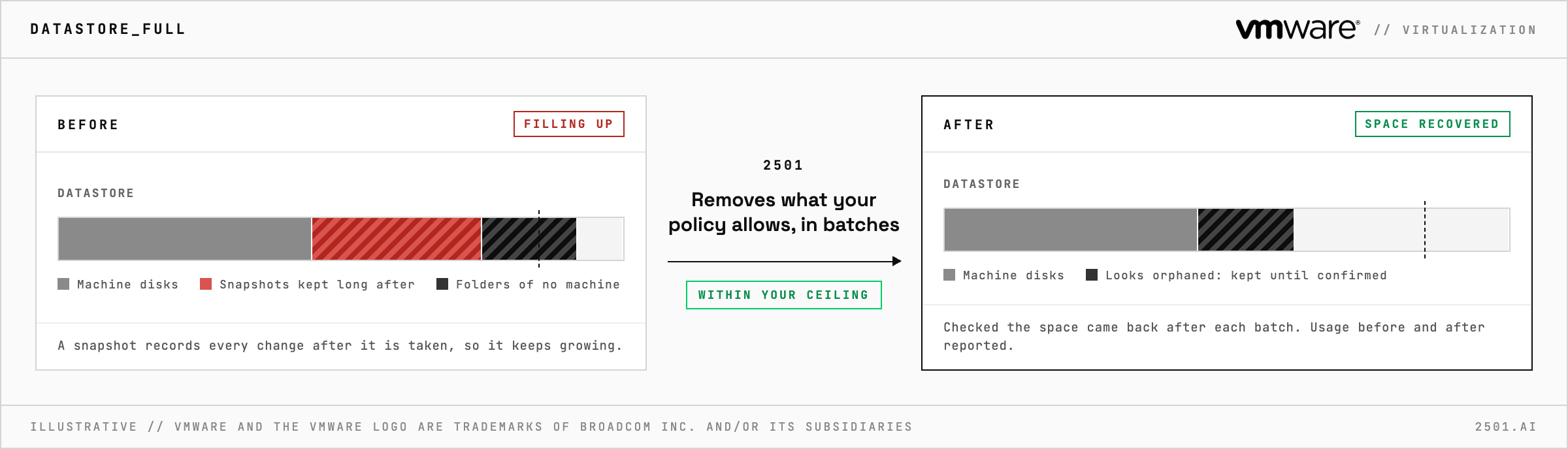
When a VMware datastore fills up, deleting whatever looks biggest is the quick fix, but a file that looks abandoned may still belong to a machine, and removing a snapshot needs free space before it gives any back. 2501 finds what is filling the datastore, removes only what your policy allows, and reports the space it recovered, all within limits you set.
Snapshots are the usual cause. A snapshot is not a still copy: it records every change the machine makes after it is taken, so one kept long after the change it protected keeps growing. Folders left behind by machines that no longer exist are the other usual cause.
The VMware Datastore Operator takes the capacity alert from your ticketing system and finds what is using the space: the snapshots behind the growth, and folders that belong to no machine. It removes the snapshots your policy allows once each machine is safe to work on, in small batches, checking that the space came back before going further and escalating when it did not. It reports the datastore's usage before and after, files that look orphaned with their size, and what is left for a person.

Why does removing a snapshot not free space at once? Its recorded changes are first merged back into the machine's disk, which takes time and some free room.
Can it just report what is using the space? Yes. In investigate-only mode it lists what is using the space, and removes nothing.
> READY_TO_DEPLOY
Book a technical demo and walk through your own environment with the 2501 team.
