
AGENT SPECIALTY //
Network and edge
2501's FortiOS Manager creates firewall objects, manages policies and configures VPNs on FortiGate from your tickets, and investigates blocked traffic and tunnels.
TICKETS FROM
ServiceNow or another ITSM
CATEGORY
Network and edge
AUTONOMY
Investigate only, with a person, or on its own
DEPLOYMENT
On-prem, cloud or hybrid
█
SPECIALTY_BRIEFING
// WHAT 2501 DOES
FortiOS Manager is 2501's specialty for FortiGate firewalls: it creates objects, manages policies and configures VPNs from your tickets, in the same FortiOS command line your engineers use. It acts only as far as you allow.
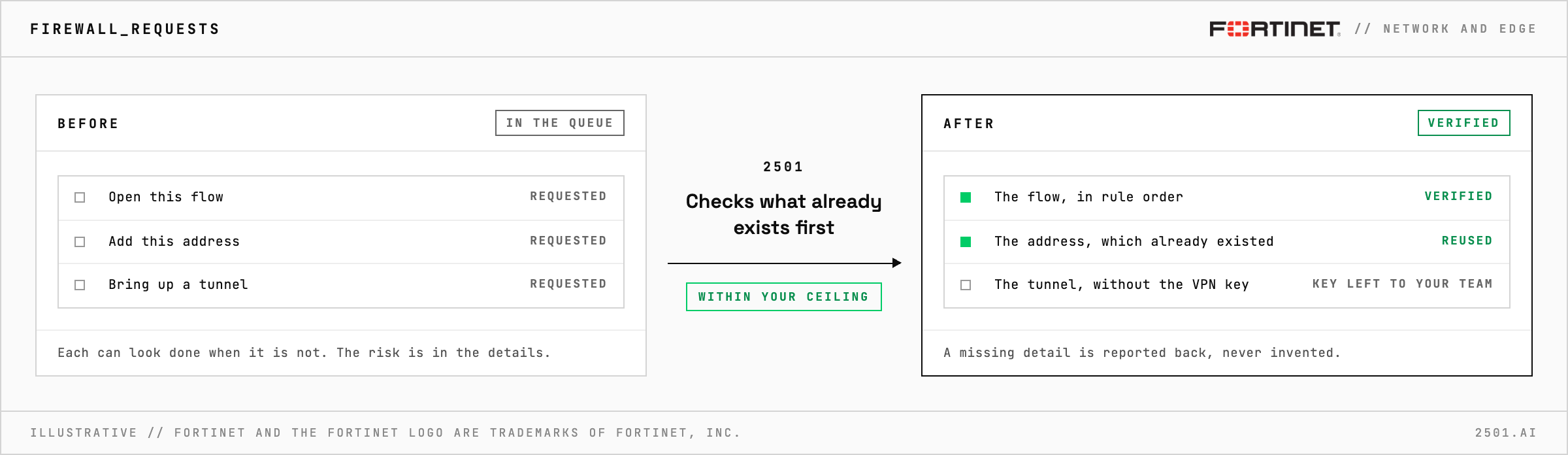
Firewall requests are small and exact: open this flow, add this address, bring up a tunnel. The risk is in the details. An object that already exists under another name, a rule below one that matches first, or two tunnel ends that disagree can each leave a request looking done when it is not.
The FortiOS specialty takes these requests from your ticketing system. It checks what already exists, reuses objects rather than duplicating them and follows your naming conventions. New rules respect rule order, since the first match wins, and each change is verified once made. It also investigates blocked traffic and tunnels that are down. It never guesses: a missing detail is reported back rather than invented, and without a VPN's pre-shared key it configures the rest and leaves the key to your team.

Which Fortinet devices does it cover? It is built for FortiGate appliances. 2501 agents also work on FortiSwitch and FortiAP through the same FortiOS shell.
What if the object already exists? It reports what is there and asks whether to change it instead.
Each page is one kind of ticket, and how this specialty handles it within the limits you set.
> READY_TO_DEPLOY
Book a technical demo and walk through your own environment with the 2501 team.

