
SOLUTION //
PaloAlto Manager
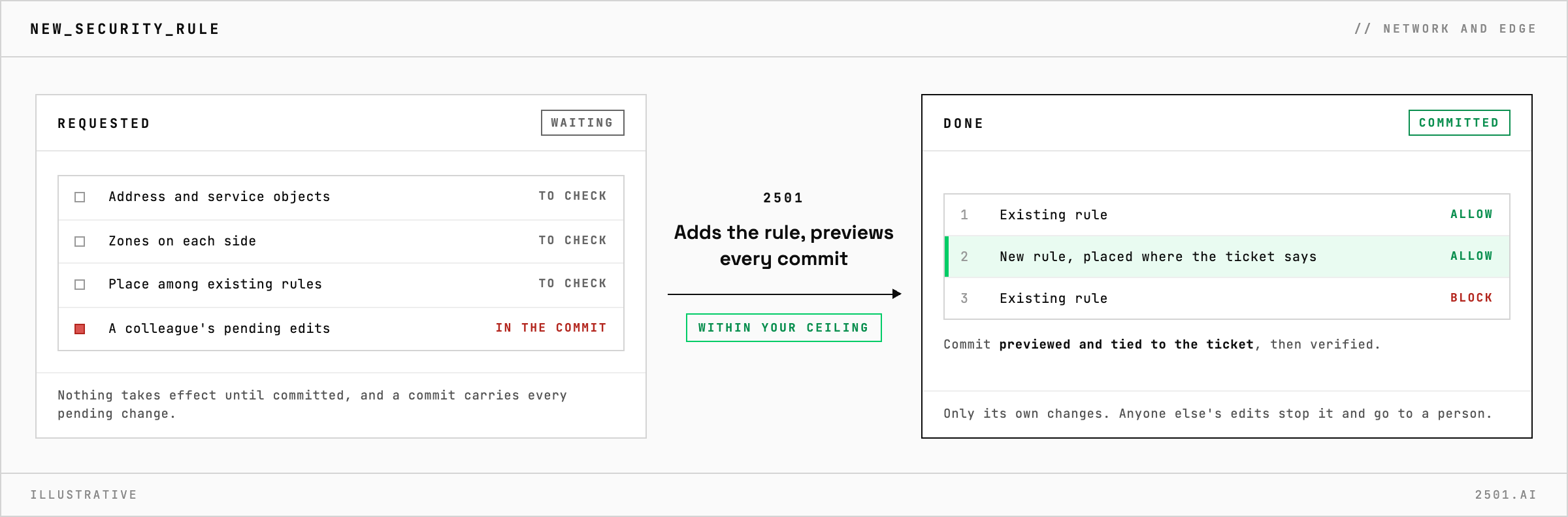
On PAN-OS a commit can carry every pending change. How 2501 adds the rule your ticket asks for, previews each commit and never commits edits it did not make.
TICKETS FROM
ServiceNow or another ITSM
SAFEGUARDS
Your rules, confirmation and blacklists
AUTONOMY
Investigate only, with a person, or on its own
DEPLOYMENT
On-prem, cloud or hybrid
█
SOLUTION_BRIEFING
// HOW 2501 HANDLES IT
On a Palo Alto firewall nothing takes effect until it is committed, and a commit can carry every pending change with it, so a rushed commit can push a colleague's half-finished edits along with yours. 2501 adds the rule your ticket asks for, previews every commit, and stops rather than commit changes it did not make, all within limits you set.
A request to allow one flow looks like one rule. On PAN-OS it can also mean new address or service objects, the zones on each side, a place among the existing rules and, on Panorama, a push to the right group of firewalls.
The PaloAlto specialty takes the request from your ticketing system and checks what already exists, reusing objects and following your naming conventions. It writes the rule with the zones on both sides and places it where the ticket says, since the first match wins. It previews each commit before making it and ties it to the ticket, then verifies the result and reports what it changed.

Why is my new rule not working yet? It takes effect only once committed, and on Panorama once it is also pushed to the firewalls. 2501 does both as part of the ticket.
Why can a commit fail on a change that looks right? A commit validates the whole configuration, not only the new rule, so a problem elsewhere can block it. 2501 reads the error and never forces a commit past it.
> READY_TO_DEPLOY
Book a technical demo and walk through your own environment with the 2501 team.
