
SOLUTION //
CI Manager
Rerunning a failed pipeline until it passes wastes build time and hides real breaks. How 2501 retries transient CI failures once and sends real ones to their owner.
TICKETS FROM
ServiceNow or another ITSM
SAFEGUARDS
Your rules, confirmation and blacklists
AUTONOMY
Investigate only, with a person, or on its own
DEPLOYMENT
On-prem, cloud or hybrid
█
SOLUTION_BRIEFING
// HOW 2501 HANDLES IT
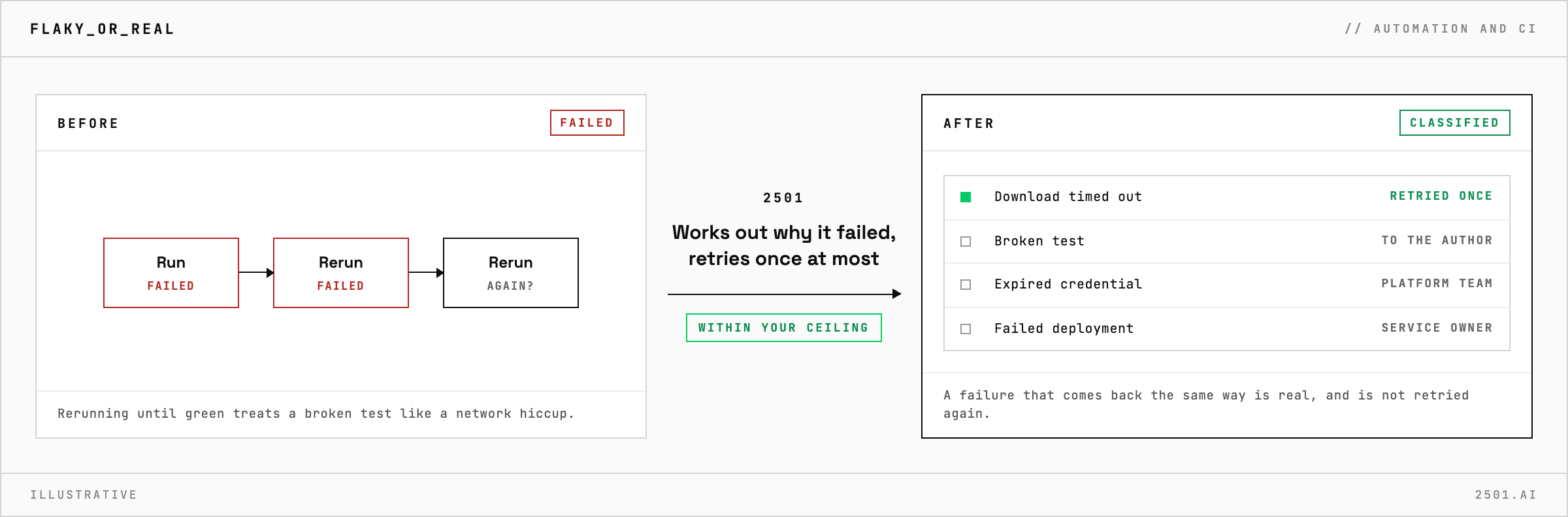
Rerunning a failed pipeline until it turns green is the quick fix, but it treats a broken test like a network hiccup and burns build time. 2501 works out why the run failed, retries it once when the cause was transient, and sends a real failure to whoever owns the fix.
A run can fail because a download timed out or a build machine dropped out, or because of a broken test, an expired credential or a deployment that failed its checks. Each has a different owner.
The CI specialty reads the failed run before it touches anything and classifies the failure. A transient one gets a single retry, and the agent waits for the result before closing the ticket; if the same failure comes back, it is real. A real failure goes with the evidence to its owner: the author of the change for a failing test or build, the platform team for credentials and build machines, the service owner for a deployment. It reports what failed, why and what it did, across GitHub Actions, GitLab CI, Jenkins, CircleCI and Azure DevOps.

Why not rerun a failed deployment straight away? A deployment that failed partway can leave the environment half updated, and running it again on top can make things worse. The environment's state is confirmed first.
Can it classify failures without retrying anything? Yes. In investigate-only mode it reports why the run failed and who owns the fix, and retries nothing.
> READY_TO_DEPLOY
Book a technical demo and walk through your own environment with the 2501 team.
